Axis 7100 Installationsanleitung Seite 45
- Seite / 424
- Inhaltsverzeichnis
- FEHLERBEHEBUNG
- LESEZEICHEN

- ADT 7100 1
- RECORD OF CHANGES 3
- SAFETY FIRST 4
- Safety Features 5
- Safety First 6
- BEFORE YOU BEGIN 8
- Contents at a Glance 9
- Reference Documents 10
- CONVENTIONS 11
- Abbreviations and Acronyms 12
- TABLE OF CONTENTS 13
- _______________________6.4-1 15
- LIST OF FIGURES 19
- List of Figures 20
- LIST OF TABLES 25
- List of Tables 26
- 1 INTRODUCTION 27
- 1.2 Standard Features 28
- 1.3 Modes of Operation 28
- 1.4 Available Models 29
- 1.5 Options 29
- Introduction 30
- 1.6 Available Models 31
- Available Models 32
- 2 SYSTEM DESCRIPTION 35
- System Description 36
- 2.1 Main Subsystems 37
- 2.1.1.3 Power Lights 39
- 2.1.2 Dicer 40
- 2.1.2.1 Vision System 41
- 2.1.2.1.2 Illumination 41
- 2.1.3 Light Tower 42
- Main Subsystems 44
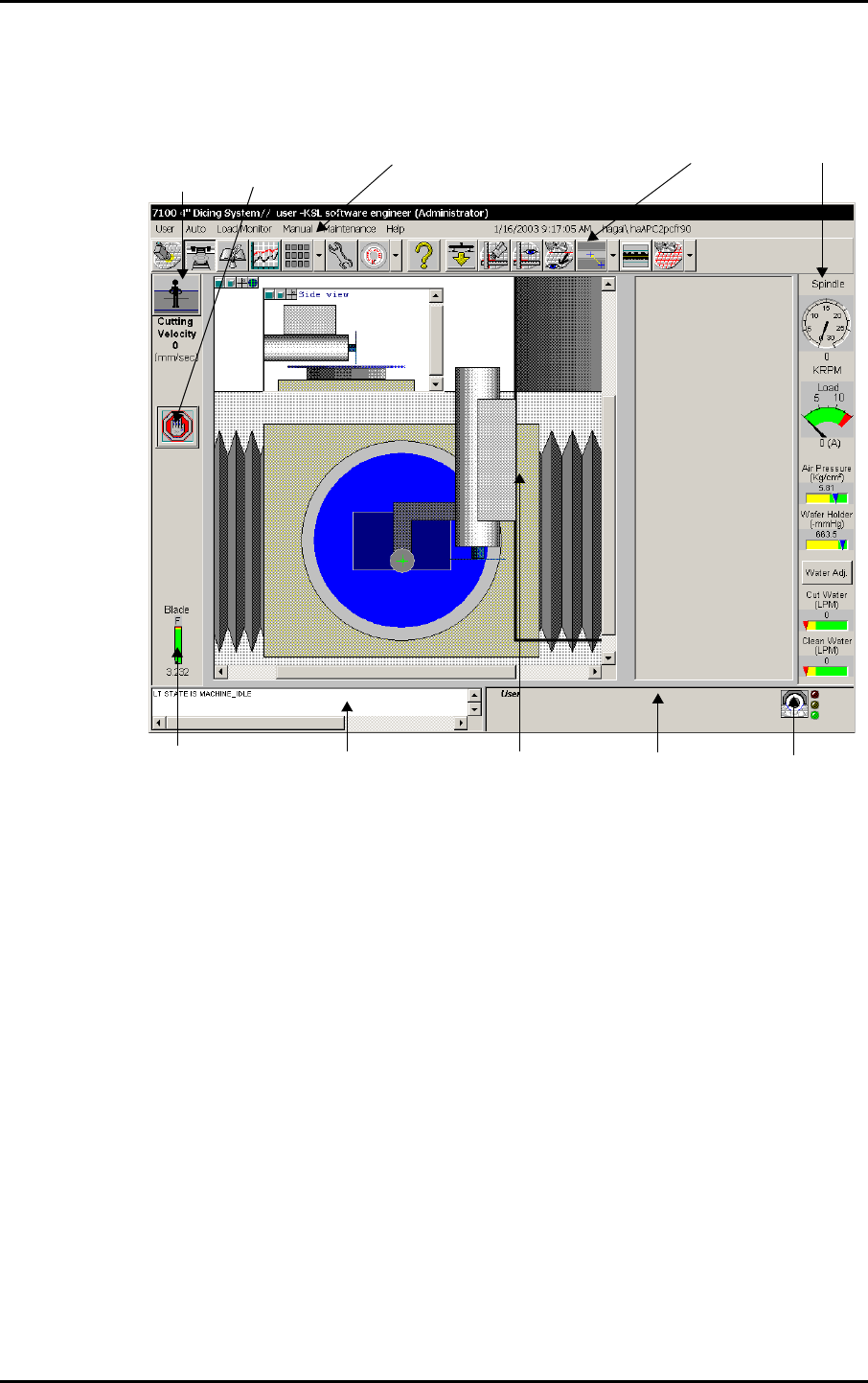
- 2.2 Graphical User Interface 45
- 2.2.1 Menu Bar 46
- 2.2.1.3 Load Monitor Menu 47
- 2.2.1.4 Manual Menu 47
- 2.2.1.5 Maintenance Menu 48
- 2.2.2 Toolbar 49
- Graphical User Interface 50
- 2.2.3 Gauges 52
- 2.2.4 Dicer Status Indicator 53
- 2.2.5 Active User Field 54
- 2.2.6 Activity Log 54
- 2.2.7 Blade Indicator 54
- 2.2.8 Run Button 55
- 2.2.9 Stop Button 55
- 2.2.10 Workspaces 56
- 2.2.10.1 Main Workspace 58
- 2.2.10.1.1 Top View Area 59
- 1 Upper Limit 60
- 2 Lower Limit 60
- 2.2.10.1.2 Side View Area 61
- 2.2.10.2 Video Workspace 62
- 2.2.10.2.2 Display Controls 64
- 2.2.10.2.3 Zoom Controls 67
- To Enable the Zoom Option: 67
- To Use Digital Magnification: 68
- 2.2.10.2.5 Wizard/Model Area 69
- 2.2.10.2.7 Other Buttons 72
- 2.2.10.4 Workbook Workspace 74
- 2.3 System Configuration 83
- System Configuration 84
- 2.4 Menu Navigation Chart 85
- Menu Navigation Chart 86
- 3 SYSTEM OPERATION 87
- System Operation 88
- 3.1.1 Powering Up the System 89
- Powering Up/Down Procedures 90
- To Power Down the System: 91
- 3.1.2.1 Lockout/Tagout 91
- 3.2 Logging In 93
- Logging In 94
- 3.3 System Initialization 95
- System Initialization 96
- 3.4 Defining the Job 97
- Defining the Job 98
- Placing/Removing a Workpiece 100
- 3.6 Model 7100 Workflows 101
- Model 7100 Workflows 103
- 3.6.3 Manual Mode Workflow 105
- 3.6.4.4 Teaching the Index 106
- 3.6.4.1 Defining Jobs 106
- 3.6.4.1.1 Assigning Recipes 106
- 3.6.4.3 Teaching Alignment 106
- 3.6.4.5 Manual Alignment 107
- 3.6.4.6 Blade Changing 107
- 3.6.4.7 Manual Y Offset 107
- 3.7 Stopping System Operation 109
- 3.7.3 Pausing a Process 110
- 3.7.4 Manual Stop 110
- 3.8 Log File 111
- 3.8.1 Applying Log Filters 112
- 3.8.2 Log File Find Feature 112
- 3.8.3 Exporting Log Files 113
- 3.8.4 Periodical backup 113
- Log File 114
- 4 ADMINISTRATION 115
- Administration 116
- 4.1 Access Levels 117
- Access Levels 118
- 4.2 Modifying Access Levels 119
- 4.2.2 User Interface Elements 120
- Modifying Access Levels 121
- 4.2.3 Protected Mode 123
- 4.3 Adding and Removing Users 125
- Adding and Removing Users 126
- 5 BUILDING RECIPES 127
- Create a New Recipe 129
- Define Recipe 129
- Properties 129
- Specify Recipe 129
- Parameters 129
- Building Recipes Workflow 130
- 5.2 Creating a New Recipe 131
- Creating a New Recipe 132
- Defining Recipe Properties 133
- To Define Recipe Properties: 134
- To Change Blades: 138
- 5.3.2.2 Defining New Blades 138
- To Define a new blade: 139
- To Modify Blade Properties: 139
- 5.3.2.4 Deleting Blades 140
- To delete a blade: 140
- 5.4.1 Accessing Parameters 141
- Specifying Recipe Parameters 142
- To Display Recipe Parameters: 144
- 5.4.3.1 Defining Angles 145
- 5.4.3.1.1 Adding New Angles 145
- Workpiece 145
- Angle 90 145
- To Define New Angles: 146
- 5.4.3.1.2 Moving Angle Tabs 146
- 5.4.3.1.3 Modifying Angles 147
- To Modify Angles: 147
- 5.4.3.1.4 Angle Access Rights 148
- 5.4.3.2 Specifying Parameters 148
- 5.4.3.2.1 Adding Parameters 148
- To Modify Parameter Values: 150
- 5.4.3.2.3 Deleting Parameters 150
- To Export a Recipe: 151
- To Import a Recipe: 152
- 5.6 Recipe Templates 155
- 5.6.2 APC Loop Cut Template 156
- 5.6.3 GPC Standard Template 157
- Recipe Templates 158
- 5.6.6 GPC Dressing Template 160
- 6 DICER PROCEDURES 161
- Dicer Procedures 162
- 6.1 Workpiece Alignment 163
- 6.1.1 Manual Alignment 164
- 6.1.1.2 Defining Cut Position 165
- 6.1.2 Auto Alignment 166
- 6.1.2.1 Teach Index 167
- To Teach the Index: 167
- Workpiece Alignment 168
- To Teach the Index Manually: 170
- Move manually 171
- Street Dice 171
- Cut position 171
- Align Index 172
- To Select an Align Type: 173
- To Perform Teach Alignment: 175
- • Low Model Detection 176
- • Main Model Detection 176
- 6.1.3.3.1 Low Model Detection 177
- Figure 6-18 183
- 6.1.5 Model Types 184
- 6.1.5.2 Align Kerf Model 185
- 6.1.7 Rotational Shrinkage 187
- 6.1.8 Average Index 188
- 6.2 Cut Verification 193
- Cut Verification 194
- 6.2.2 Auto Cut Verification 195
- 6.3 Kerf Checking 197
- 6.3.3 Kerf Check Workflow 198
- Kerf Checking 199
- 6.3.4 Automatic Kerf Checking 200
- 6.3.4.1 Main Workspace Window 202
- 6.3.5 Manual Kerf Check 203
- 6.3.6 Teach Kerf Check 205
- To Teach the Kerf Check: 207
- Figure 6-32: Teach Kerf Check 208
- 6.3.7 Kerf Check Options 209
- 6.3.7.1 Adaptive 211
- 6.3.7.2 Advanced 211
- 6.3.7.3 Adaptive Only 211
- 6.3.7.4 Advanced Only 212
- 6.3.7.5 Upper Bar 212
- 6.3.7.6 Lower Bar 212
- 6.4 Manual Y Offset 213
- To Perform Manual Y Offset: 214
- 6.4.4 Y-Offset on Dress Block 215
- Cutting Location parameter 216
- 6.5 Special Cut Procedures 217
- 6.5.3 Loop Cut 218
- Special Cut Procedures 219
- 6.5.4 Chopping 220
- 6.5.5 Multi-Panel Alignment 220
- 6.5.5.1 Angle Tabs 224
- Figure 6-43: Removing Links 225
- 6.5.6 Cut Depth Compensation 227
- 6.5.7 Negative Index 227
- 7 SAW PROCEDURES 229
- 7.1.4 Pre Non Contact Height 230
- 7.2 Blade Expansion 231
- Blade Expansion 232
- 7.3 Height Procedures 233
- 7.3.1 Height Reference Device 235
- To Perform Button Height: 236
- 7.3.2 Chuck Height 237
- Height Procedures 239
- 7.4 Blade Handling 241
- 7.4.1.1.2 Wear Rate Chart 243
- 7.4.1.2 Export Data 244
- 7.4.1.3 Blade Change Tab 245
- 7.4.1.4 Blade Type Tab 246
- 7.4.1.5 Blade Status Tab 246
- 7.4.2.2 Blade Indicator 247
- Blade Handling 248
- 7.4.2.3 Replacing a Blade 249
- To Manually Tune the BBD: 249
- To Replace a Blade: 250
- 7.4.3 Blade Dressing 255
- 7.4.3.3.2 Override Screen 259
- To Perform Dressing Manually: 261
- 7.4.3.4.2 Dressing Screen 261
- 7.5 Chuck Change 265
- Chuck Change 266
- • Calibration Start Position 266
- To Re-Teach Focus on Chuck: 267
- 8 SPECIAL FEATURES 269
- Special Features 270
- 8.1 Load Monitoring 271
- 8.1.2.2 Raw Data 273
- Load Monitoring 274
- Figure 8-4: Control Screen 275
- 8.2 Language Selection 277
- Figure 8-6) 278
- 8.3 Wafer Vacuum Check 279
- Wafer Vacuum Check 280
- 8.4.1 Stress Release 281
- 8.4.2 Theta Motion Replay 282
- 8.5 Spindle Velocity 285
- Spindle Velocity 286
- 8.8 Database Backup 291
- Database Backup 292
- Figure 8-11: Dicer Tree 293
- 13) X-limits respectively 294
- Change of Length Unit Type 295
- 8.11 Multi-Panel Bar Code 297
- Multi-Panel Bar Code 298
- • Blade Change - Lot number 298
- 9 CONFIGURATION OPTIONS 299
- Configuration Options 300
- 1 7100 model 301
- 2 Autoloader 301
- Autoloader 303
- 9.1.2.1 CassComp Workbook 305
- 9.1.2.1.1 Axes 306
- Figure 9-5: Finger Screen 308
- 9.1.2.1.2 Cassette1 309
- 9.1.2.2 MHS Workbook 309
- Figure 9-8: MHS Axes Screen 311
- 9.1.3 Autoloader Operation 312
- To Manually Load a Workpiece: 314
- 9.2 Tilted Spindle 319
- Tilted Spindle 320
- 9.2.4 Mechanical Adjustments 325
- To Adjust the Spindle Angle 326
- To Adjust the Camera position 326
- 9.3 Dress Station 329
- Dress Station 330
- To Replace the Dressing Block 332
- 9.3.3 Dress Station Setup 333
- 9.3.4 Dressing Modes 334
- 9.3.4.1 Cut Mode 335
- 9.3.4.2 Chop Mode 335
- 9.4 Wash Pipe 337
- Wash Pipe 338
- 9.4.1 Manual Operation 339
- 10 TROUBLESHOOTING 343
- Troubleshooting 344
- Error Message Information 346
- 10.2 Recipe Problems 347
- Recipe Problems 348
- 10.3 Initializing the System 349
- Initializing the System 350
- 10.4 Height Problem 351
- Height Problem 352
- Wizard appears 357
- If Nothing Helps 359
- KMI and Database 359
- 10.7 If Nothing Helps 361
- 10.8 UPS Bypass 363
- UPS Bypass 364
- A APPENDICES 367
- The Model 7100 Glossary 368
- Appendix 2: Algorithms 374
- Align Algorithms 375
- Kerf Check Algorithm 376
- Bright Kerf Algorithm 376
- Kerf Check Teach Algorithm 377
- Appendix 3: Recipe Parameters 378
- Align Parameters 379
- Recipe Parameters 380
- Align Kerf Model Parameters 384
- Auto Height Compensation 385
- Average Index Parameters 386
- Bar Code Parameters 387
- Blade Parameters 388
- Max Cut Width 389
- Cut Parameters 390
- Cut Verify Parameters 394
- Cut Verify Limit Parameters 396
- Diagnostisc Parameters 397
- Dressing Parameters 397
- Dress Block Parameters 398
- Height Parameters 400
- Kerf Check Parameters 401
- Kerf Check Limit Parameters 403
- Load Monitor Baseline 405
- Loop Cut Parameters 406
- Manual Inspection Parameters 406
- Model Precessing Parameters 408
- MHS Parameters 409
- Multi-Panel Parameters 409
- Override Parameters 409
- Shrinkage Parameters 410
- Teach Center Parameters 412
- Tilted Spindle Parameters 413
- Wash Pipe Parameters 413
- Y Offset Parameters 414
- See Access Levels 417
- See Dressing 417
- See Height 417
- See Kerf Check 418
- See Assigning Recipes 418
- See Override 419
- Index-iv 420
- See Workpiece 422
- Index-viii 424
Verwandte Produkte und Handbücher für Server Axis 7100
 (24 Seiten)
(80 Seiten)
(134 Seiten)
(108 Seiten)
(69 Seiten)
(10 Seiten)
(24 Seiten)
(80 Seiten)
(134 Seiten)
(108 Seiten)
(69 Seiten)
(10 Seiten)
 (26 Seiten)
(2 Seiten)
(27 Seiten)
(26 Seiten)
(2 Seiten)
(27 Seiten)
© 2020, manymanuals.de. Alle Rechte vorbehalten. | 0.048 s |
 Manymanuals.com
 Manymanuals.de
 Manymanuals.fr
 Manymanuals.it
 Manymanuals.pl
 Manymanuals.cz
 Manymanuals.es
 Manymanuals-pt.com
Kommentare zu diesen Handbüchern